Taboola is one of the largest native advertising platforms in the world. It serves over 450 billion recommendations per month across thousands of publisher sites, reaching more than 1.4 billion users globally. Because of its scale, it attracts significant spend from affiliates, performance marketers, and direct advertisers across many verticals.
That volume is the point. When that many campaigns are running in one place, the data tells you exactly what’s working. The headlines that are getting clicks.
The angles that have been running for months. The funnels that are profitable enough to scale aggressively. The operators doing serious volume aren’t guessing.
They’ve tested, found what works, and are now pushing the budget behind it.
Your job, before you spend a dollar of your own traffic budget, is to find those campaigns and understand them. This guide shows you exactly how to do that using AdPlexity Native.
Why Taboola Ad Research Is Different from Other Networks
Taboola operates at a scale that most native networks don’t match. That scale creates a specific research dynamic worth understanding before you start.
Because Taboola has so much inventory across so many publishers, campaigns can run profitably at a wide range of bid levels and placements.
A campaign that’s crushing it on one publisher site may break even on another. That means the most valuable intelligence isn’t just “which ad is running” but “which ad has been running for a long time, across multiple placements, in a specific GEO.”
Longevity and distribution are the signals that separate profitable campaigns from tests.
Taboola is also where a lot of the most competitive affiliate verticals play out at scale: nutra, finance, insurance, sweepstakes, and legal.
These verticals have high CPCs, high competition, and fast-moving creative cycles. What’s working this month may be saturated by next month. Research done on stale data isn’t just less useful in these niches. It’s actively misleading.
This is why real-time data and a filter system built for affiliate research matter more on Taboola than almost anywhere else in native.
What You’re Actually Looking For When You Spy on Taboola
Before touching the tool, it helps to be clear on what you’re hunting. Most beginners use spy tools to find ads they like. That’s not the goal. The goal is to find evidence of profitability and then understand the full funnel behind it.
Evidence of profitability on Taboola looks like this:
- Long run duration. A campaign that’s been live for 60, 90, or 120+ days on Taboola is not a test. Traffic on Taboola costs money. Nobody runs an unprofitable campaign for three months. If it’s still live, someone is making money on it.
- High ad volume from a single domain. An advertiser running 40-60 creative variations in the same vertical is scaling. They’ve found a winning angle and are testing variations around it. That’s the operation you want to reverse-engineer.
- Consistent GEO targeting. A campaign locked into US, UK, or CA traffic for months tells you the GEO is converting. A campaign jumping around GEOs is still trying to find a market.
- Funnel structure. The ad is just the entry point. What matters is the full path: ad to prelander to offer. Understanding why a funnel converts requires seeing all three pieces together.
Keep those four signals in mind as you go through the research workflow below. They’re what you’re looking for in every session.
Step 1: Start with the Domains Dimension, Not the Ad Feed
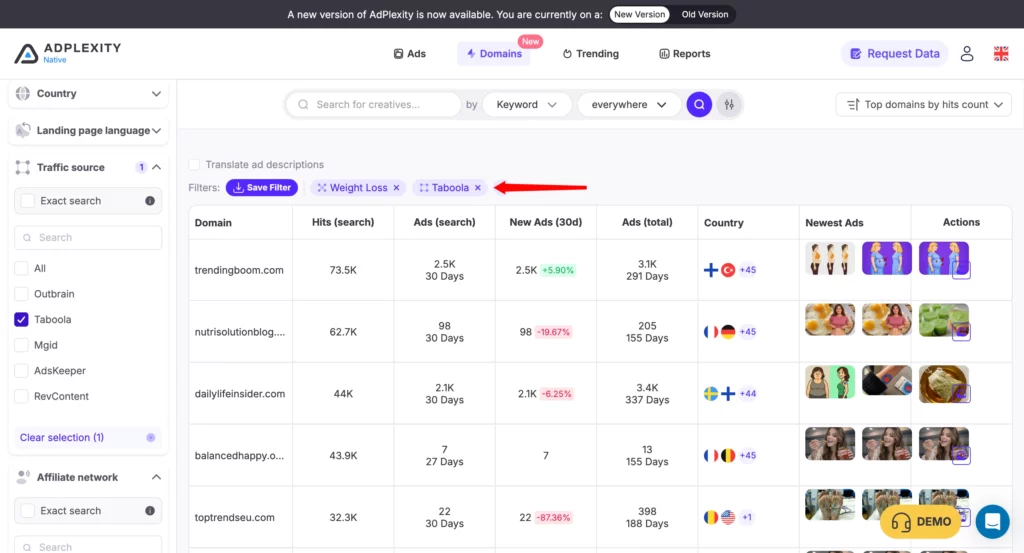
Most spy tools start you at the ad level. AdPlexity Native gives you a better entry point: the Domains dimension.
Instead of scrolling through individual ads, the Domains view shows you the advertisers behind the campaigns. For any search you run, you can see every domain that’s active in that space, ranked by ad volume, with the number of new ads launched in the last 30 days, the GEOs they’re targeting, and how long they’ve been running.
Here’s why this matters for Taboola research specifically. The Domains view immediately answers the question that takes most buyers 30-40 minutes to piece together manually: who is actually spending seriously in this vertical right now?
A domain with 50+ new ads in the last 30 days and a 90-day run history on Taboola US isn’t experimenting. They’ve cracked something.
That’s your anchor for the research session. Start with them, not with a random ad that came up in a keyword search.
How to use it: Open AdPlexity Native, go to the Domains view, set your filters (vertical, network: Taboola, GEO), and sort by ad volume or days running. The top results are your research targets. Click through to see their full ad library.
Step 2: Filter by Network, GEO, and Device
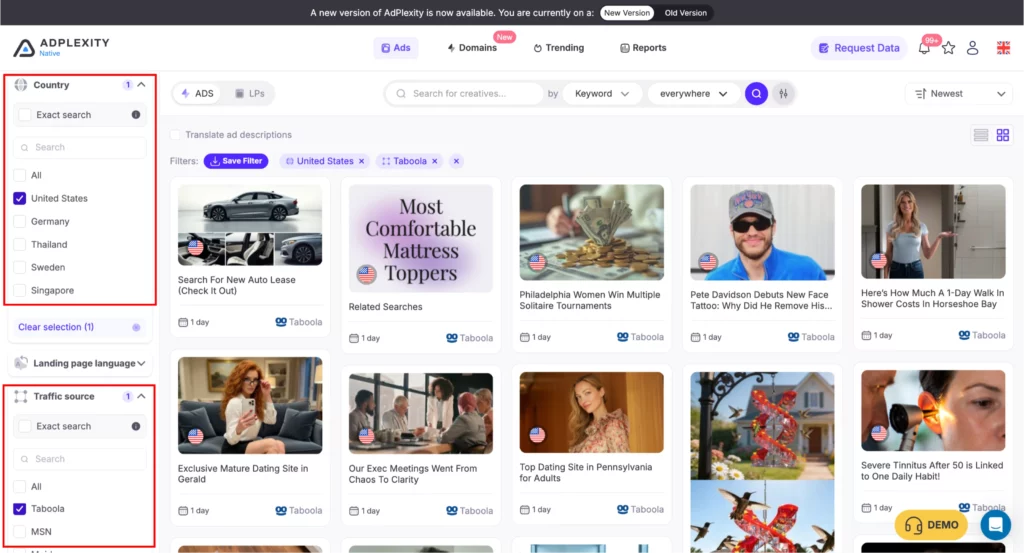
Once you’ve identified your target advertisers in the Domains view, or if you’re doing a broader creative sweep, set your core filters to narrow the database to the relevant results.
Network: Taboola. Always set this first. You’re not interested in what’s running on Outbrain or MGID for this session. Taboola has its own audience behavior, publisher mix, and performance patterns. Research stays cleaner when you isolate one network at a time.
GEO. Set the country or countries you’re targeting. If you’re launching in the US, filter to US. If you’re researching Tier 2, filter by the specific countries you’re considering.
Don’t leave this open unless you’re doing a broad market scan. The creative angles, headlines, and offers that work in the US are often completely different from what converts in the UK or Germany.
Device. Taboola traffic behaves differently on desktop vs mobile. Desktop tends to perform better for long-form advertorials and finance offers.
Mobile skews toward shorter funnels and certain verticals like sweepstakes and app installs. If you know which device you’re targeting, filter for it. If you’re still deciding, research both separately and compare what you find.
Step 3: Use the AI Vertical Filter to Skip the Keyword Guessing
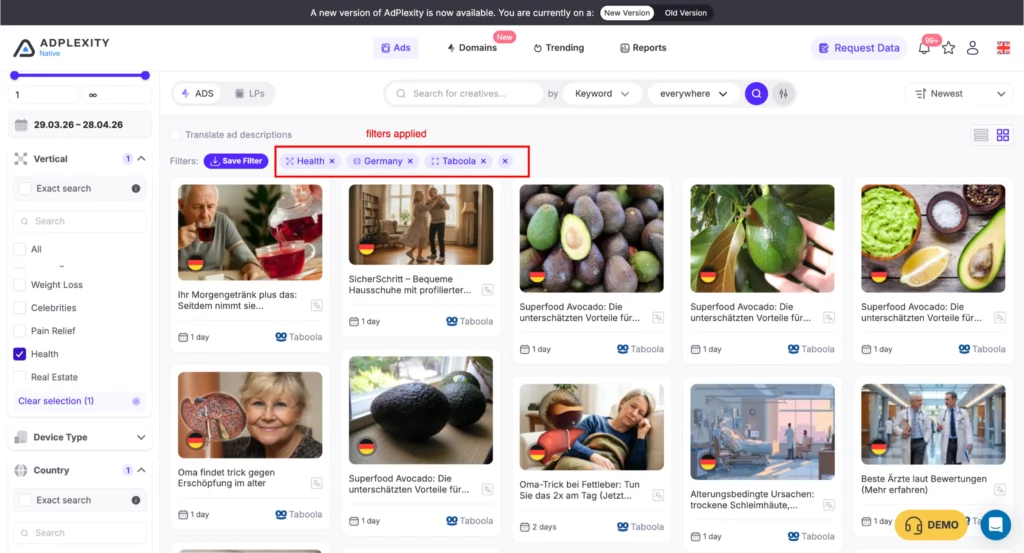
If you’re researching a specific niche, the AI vertical filter is the fastest way to surface relevant campaigns without building keyword lists.
AdPlexity’s vertical classification covers 40+ niches: Weight Loss, Finance, Insurance, Nutra, Sweepstakes, Dating, Solar, Legal, and more.
Instead of trying to figure out which keywords an insurance advertiser might use in their ad copy, you select the vertical and AdPlexity’s classification does the work.
This is especially useful on Taboola because headline styles vary widely by vertical. A nutra campaign might use curiosity-gap headlines with no product mention.
An insurance campaign might use fear-based benefit headlines. A finance campaign might look like editorial content. Keyword searches often miss many relevant campaigns because the copy doesn’t always include obvious vertical keywords. The AI filter catches them anyway.
How to use it: Select your vertical from the AI filter dropdown, combine it with the Taboola network filter and your GEO, and sort by days running. The result is a clean view of what’s been profitable in your niche on Taboola, without manual keyword work.
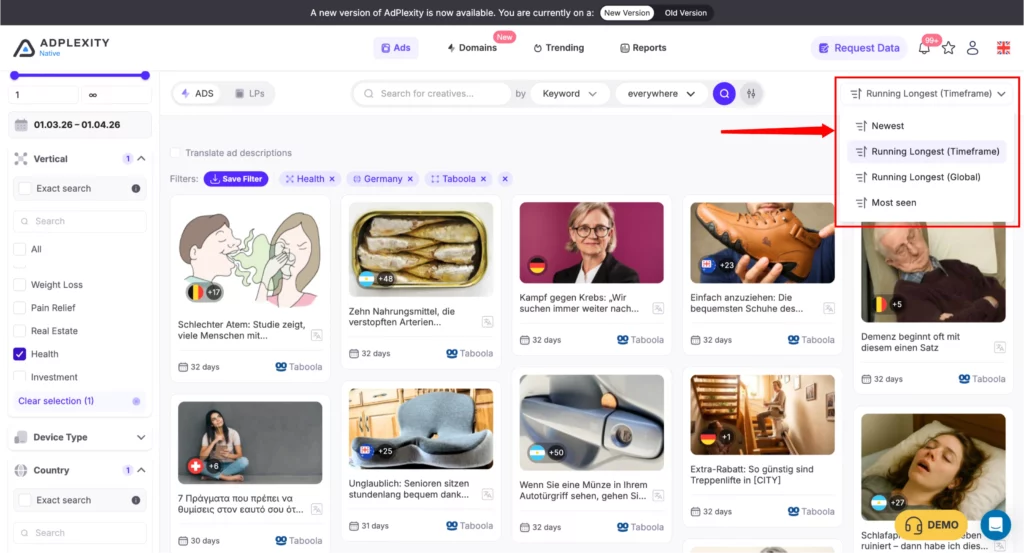
Step 4: Sort by Days Running to Find Proven Winners
This is the single most important sort in native ad research, and it’s worth its own section.
When you sort by days running (longest first), you’re not looking at what’s popular or what has the most impressions. You’re looking at what has survived long enough to be profitable.
On Taboola, where clicks cost real money and campaigns have real overhead, a 90-day campaign is a campaign that someone has been actively funding and optimizing for three months because it keeps working.
The contrast with the “newest” sort is stark. New campaigns are tests. Some will work, most won’t. When you sort by newest, you’re looking at the beginning of that process. When you sort by longest running, you’re looking at the survivors.
For research purposes, start with the long-runners. Understand what they’re doing.
Then, if you want to catch emerging trends, you can switch to the newest and look for patterns in what’s launching right now. Both have value, but if you only have time for one, sort by days running.
Step 5: Use the Affiliate Network and Tracker Filters to Find Offer Intelligence
This step is specifically for affiliate buyers, and it’s one of the most powerful parts of AdPlexity’s filter system.
The affiliate network filter lets you see which CPA network a campaign is promoting, directly from the interface, without clicking through the ad or reverse-engineering redirect chains.
If you’re researching what’s working on MaxBounty, ClickBank, or any other network you’re working with, you can filter specifically for campaigns promoting those networks and see exactly what angles are converting for their offers.
The tracker filter goes one level deeper. By filtering for specific tracking tools (Binom, Voluum, RedTrack, and others), you can immediately isolate affiliate-driven campaigns from brand direct campaigns.
This is useful when you want to understand what professional affiliates are running, as opposed to direct advertisers who may have completely different economics and funnel structures.
How to use it: Add the affiliate network filter for the networks you work with. Add the tracker filter to isolate affiliate-specific campaigns. Combine with the Taboola network filter and your GEO. The result is a clean view of what affiliates are running successfully on Taboola in your offers.
Step 6: Read the Full Funnel, Not Just the Ad
Once you’ve identified campaigns worth studying, don’t stop at the ad creative. The ad is just the hook. The real intelligence is in the full funnel.
In AdPlexity Native, clicking through to a campaign shows you the ad creative, the landing page, and the outgoing URL (the offer being promoted), all without clicking any external links. The outgoing URL visibility is particularly valuable: you can see which offers are being promoted on which traffic sources without alerting the advertiser or appearing in their analytics.
When you’re analyzing a Taboola campaign, look at all three layers:
- The ad: What’s the headline formula? Is it curiosity-gap, benefit-led, fear-based, or editorial? What image style is being used? Is it a stock photo, a before/after, a person, or a graphic?
- The landing page: Is it a short-form direct lander or a long-form advertorial? Where is the CTA? What proof elements are being used (testimonials, trust badges, clinical claims)? How fast does it load?
- The offer: Which network is it on? What’s the payout model? Is it the same offer being promoted across multiple creative angles, or is each ad going to a different offer?
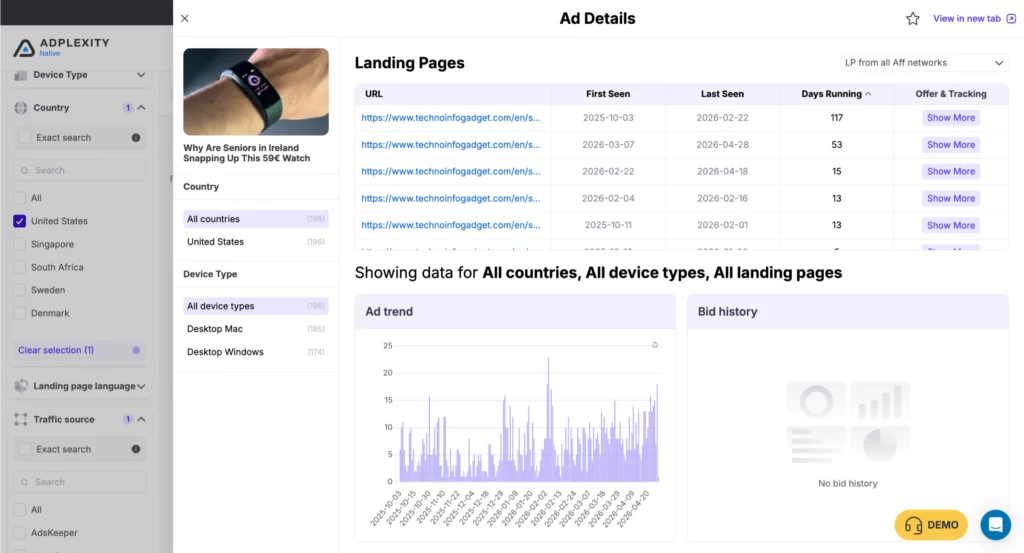
The pattern across multiple winning campaigns in the same vertical is your playbook. You’re not copying anyone. You’re understanding what the market has already validated.
Step 7: Download the Landing Page and Adapt It
Once you’ve found a funnel worth modeling, AdPlexity Native lets you download the full landing page as a .zip file that includes all assets: HTML, CSS, JavaScript, images, and scripts. Everything you need to deploy or adapt the page is in the archive.
If you use LanderLab as your landing page builder, the workflow is even faster.
One click imports the competitor’s lander directly into LanderLab, where you can edit it visually and push your own version live without touching code or a file manager.
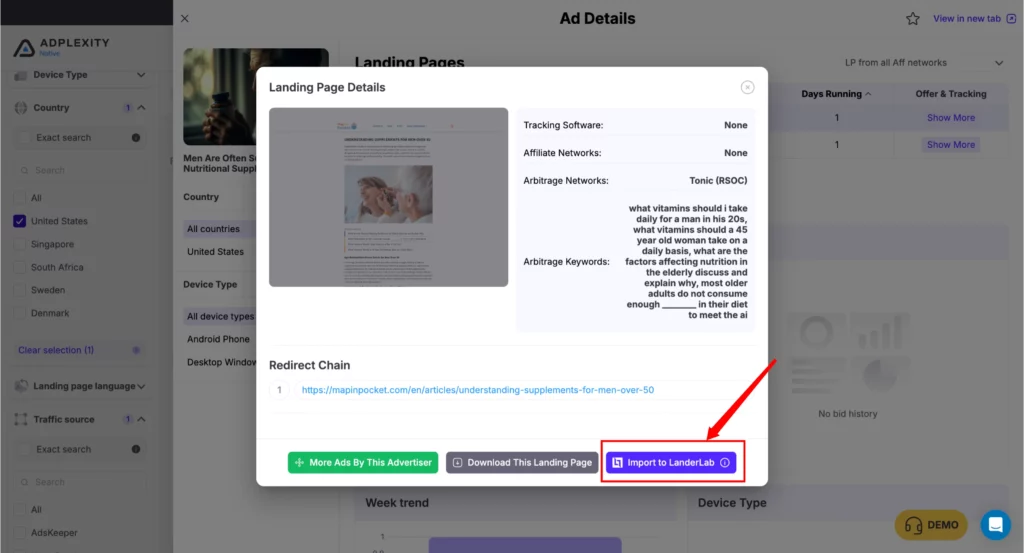
You swap the headline, adjust the angle for your specific offer, change the CTA, and it’s ready to test.
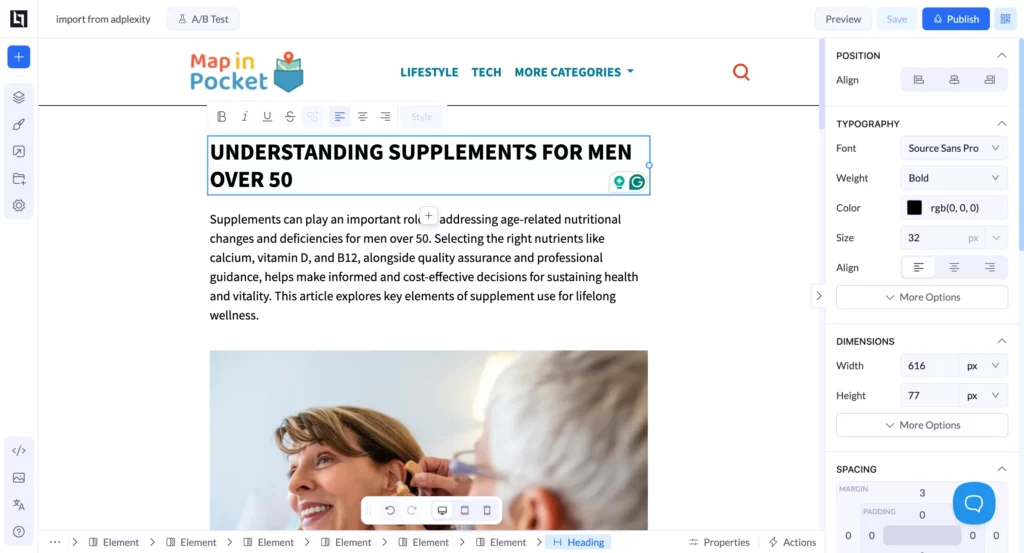
A note on how to use downloaded landers correctly: you’re not launching a copy. You’re using it as a reference for structure, layout, proof elements, and flow.
The angle, the copy, and the offer should be adapted for your specific campaign. What you’re taking from the competitor is the structural intelligence: what kind of page is working in this vertical on this network right now.
Vertical-Specific Tips for Taboola Research
Nutra and Weight Loss
Long-form advertorials dominate in nutra on Taboola. Look for campaigns with 90+ day run histories, as that’s the threshold where you can be fairly confident something is profitable.
Pay attention to the angle on the prelander: is it a “doctor reveals” format, a personal story, a news-style article, or a listicle? The angle is often more important than the offer itself in nutra. Also look for which CPA networks are being used: many top nutra affiliates run on private networks rather than public ones, so tracker detection can help you identify these faster.
Finance and Insurance
Finance and insurance campaigns on Taboola tend to use editorial-style headlines and news-adjacent creative. They often look more like content than ads.
Filter for US and UK traffic specifically, as these are the highest-value GEOs for most finance offers. The landing pages in finance often skip the prelander entirely and go direct to a form or a quiz funnel. Pay attention to which format is currently dominating in your specific niche (loans, debt consolidation, insurance quotes, etc.) as these can shift over time.
Sweepstakes
Sweepstakes on Taboola tends to skew mobile and Tier 2 GEOs, though US sweeps still run profitably. The creative cycles are faster here than in nutra or finance, so look at both long-running campaigns for structural intelligence and newer campaigns for current angle trends.
The Domains view is particularly useful in sweepstakes because a few heavy operators often dominate the category and running the same core offer across many creative variations.
Legal and Mass Tort
Legal campaigns on Taboola are some of the highest-CPC native campaigns you’ll find. Run times can be shorter here because case intake windows open and close, but within an active campaign window, long-run campaigns are still the strongest signal.
Filter specifically for US traffic and look at how landing pages handle the compliance angle, since legal campaigns have specific requirements around how claims can be made.
What a Full Taboola Research Session Looks Like
To bring it all together, here’s a complete session from start to finish.
You’re launching a nutra offer in the US on Taboola. You open AdPlexity Native and go to the Domains view. You filter: AI vertical (Weight Loss), network (Taboola), GEO (United States). You sort by days running, longest first.
The top results show you the domains that have been spending in weight loss on Taboola US the longest. You spot one that’s been running for 110 days and launched 43 new ads in the last 30 days. Signal. You click through to their full ad library.
You see, they’re running two main angles: a “doctor reveals” format and a personal transformation story. The transformation story has been running for 95 days. The doctor format is newer, 30 days. You click the transformation story campaign and look at the full funnel: ad creative, prelander (long-form advertorial, personal story format, 1,200 words, CTA at the bottom and in the middle), and the offer (health supplement on a private network, detected via tracker filter).
You download the landing page into LanderLab. You keep the structure and the flow, rewrite the story angle for your specific offer, swap the CTA to match your network’s landing page requirements, and push it live. You launch with a headline variation based on two other winning headlines you spotted in the research session.
Total time: 20 minutes. Total guesswork: zero.
Frequently Asked Questions
Can I spy on specific Taboola advertisers with AdPlexity?
Yes. You can search by advertiser domain in AdPlexity Native and see every campaign that domain has running on Taboola, including their full creative history, the GEOs they’re targeting, and how long each campaign has been live. The Domains dimension also surfaces the biggest spenders in any vertical automatically, so you don’t need to know which advertiser to search for in advance.
How do I know if a Taboola campaign is actually profitable?
Run duration is the strongest signal. A campaign running for 60-90+ days on Taboola has been funded consistently over that period, which means it’s generating returns that justify the spend. High ad volume from a single domain (many creative variations in the same vertical) is the secondary signal: someone scaling that aggressively has found something that works.
Does AdPlexity Native show Taboola campaigns in real time?
Yes. AdPlexity Native updates in real time, not on a daily sync. In fast-moving verticals like nutra and finance on Taboola, that matters. An angle that’s gaining traction today may already have competition by tomorrow. Real-time data lets you catch trends earlier.
Can I see the landing pages behind Taboola ads?
Yes. AdPlexity Native shows you the full landing page for any campaign in the database, including the outgoing URL (the offer being promoted), without you having to click through the live ad. You can also download the full landing page as a .zip file with all assets, or import it directly into LanderLab with one click.
What verticals work best on Taboola?
Nutra (especially weight loss and supplements), finance (loans, debt, insurance), sweepstakes, legal (mass tort), and health offers consistently perform on Taboola. The network’s editorial-adjacent placement environment makes it particularly strong for advertorial-style funnels and offers that benefit from a “discovery” framing rather than a hard sell.
How is spying on Taboola different from spying on Outbrain or MGID?
The core research workflow is the same, but the creative and funnel patterns differ by network. Taboola has a broader publisher base and more volume, which means more data and more signals to work from. Outbrain tends to attract more premium publisher placements and somewhat different advertiser types. MGID has a stronger presence in certain Tier 2 GEOs. Research each network separately rather than treating native traffic as monolithic.
Do I need a Taboola account to spy on Taboola ads?
No. AdPlexity Native gives you full visibility into Taboola campaigns, creatives, landing pages, and offer data without any Taboola account or access required.
Start Your Taboola Research the Right Way
The campaigns that are winning on Taboola right now are visible if you know where to look. The Domains dimension shows you who’s spending seriously. The filter system gets you to the relevant campaigns in minutes. The real-time data means you’re seeing what’s working now, not last week.
The only thing left is to actually look.
AdPlexity Native
See exactly who’s winning in your niche, right now
Book a free demo and see how the research workflow fits your vertical and campaign goals.
No commitment required